Is Your Money Disappearing?
Don’t let poor budgeting ruin your life. Take control of your finances today and get the ultimate spreadsheet to prevent financial stress — built for any salary.
- 50-30-20 rule built in
- Works with Excel, Google Sheets & Numbers
- Track bills, expenses, debt & savings in one place
- Beautiful, fully editable dashboard
3 Tabs to Have Your Finances Sorted!
Categories Tab
The Categories Tab streamlines budgeting by organizing your financial data into clear sections.
Bills Section: Keep track of all recurring bills, pre-filled with common categories.
Expenses Section: Manage and categorize your everyday expenses with ease.
Debt Section: Stay on top of your debt payments so nothing slips through.
Fully Editable & Customizable: Add, remove or modify categories to fit your life.
Log Tab
The Log Tab is where you record actual bills, expenses and debt transactions as you spend.
Easy Date Entry: Insert the date of each transaction with a single click.
Add Value: Enter the amount of each transaction effortlessly.
Category & Sub-Category: Assign each transaction to a relevant category.
Fully Editable & Customizable: Flexible to match the way you track money.
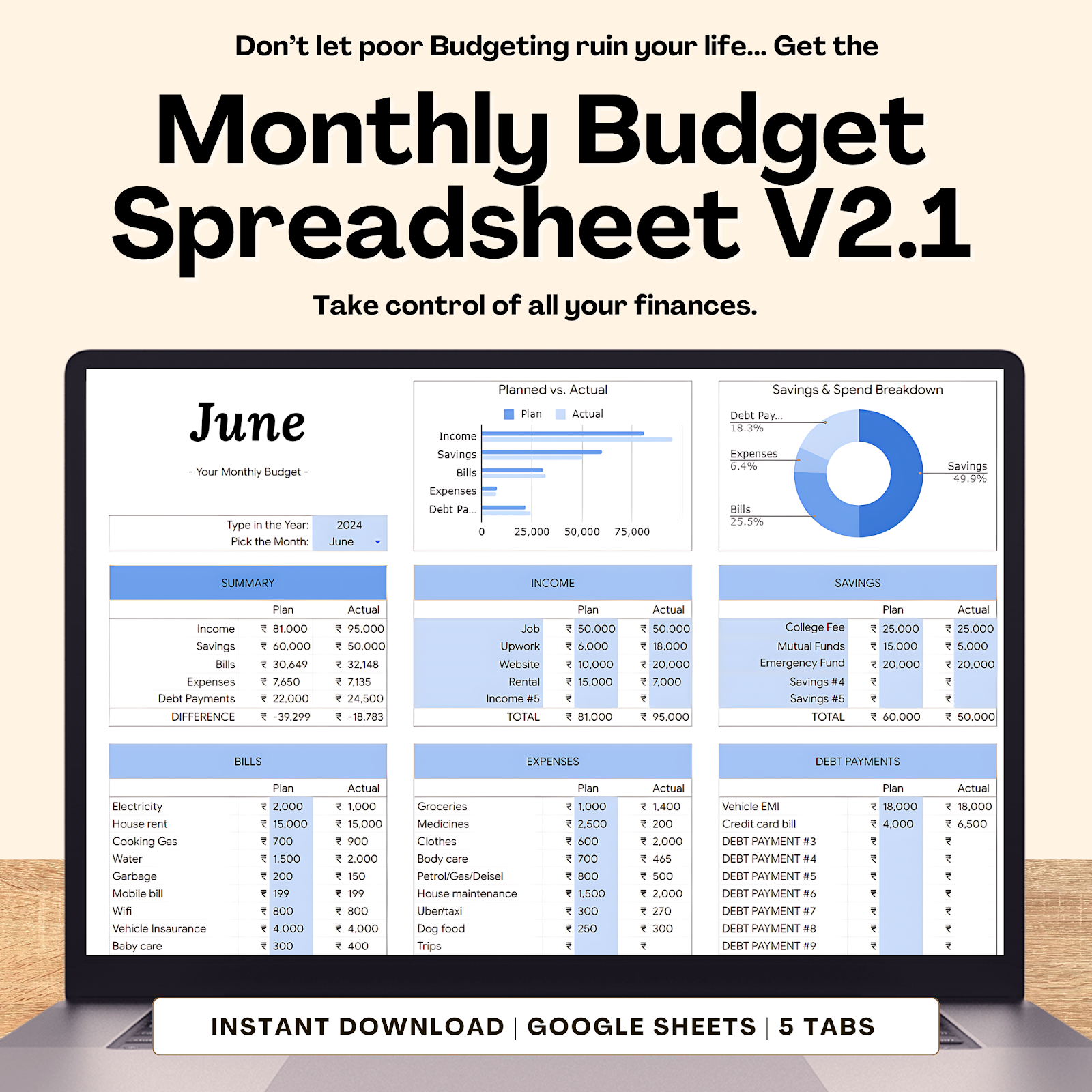
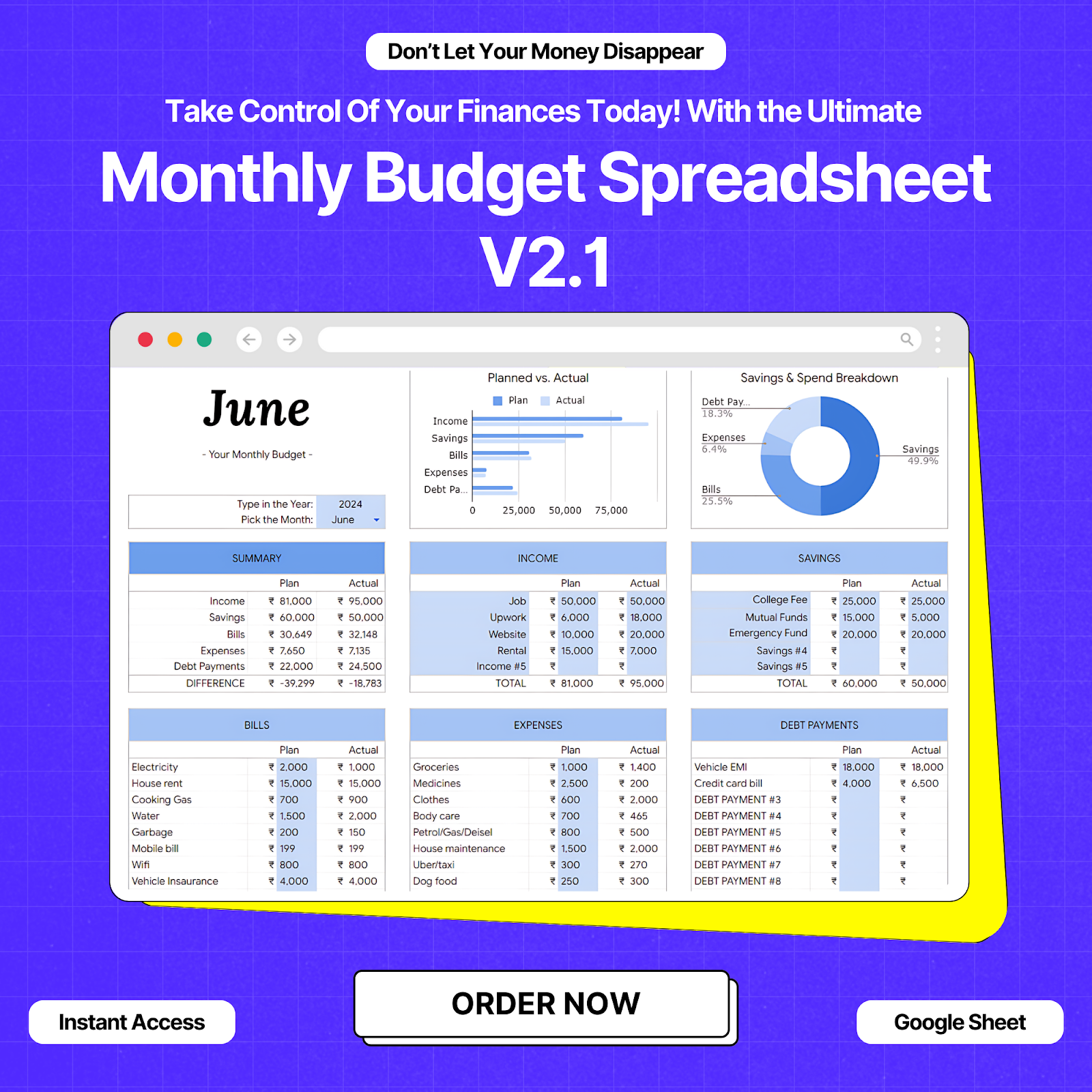
The Dashboard
A complete overview of every rupee spent in a month — clear, detailed and automatic.
Comprehensive Overview: Planned vs. actual spending, savings, income and bills.
Editable Columns: Blue columns are fully editable; the rest update automatically.
Month & Year Selection: Choose the period to display the right data.
Notes Section: Record observations and reminders right on the dashboard.
Easy Duplication: Copy the tab for the next month in seconds.
Month Dropdown: Select the correct month so every value maps correctly.
All data entered in the Categories Tab is automatically reflected on the main dashboard — a seamless, integrated view of your money.
Who Is This For?
The Easiest 4-Step Process
Download & Setup
Instantly download the spreadsheet and open it in Excel or Google Sheets.
Input Your Data
Enter your income sources and expenses. Customize categories as needed.
Track Progress
Regularly update the sheet to keep track of your financial journey.
Analyze & Adjust
Use the insights to adjust spending, boost savings and hit your goals.
99% of our customers say this spreadsheet helped them manage their finances effectively.
Benefits That You’ll Love
Monthly Budget Spreadsheet V2.1
Don’t let another month go by without taking control of your finances. Order today and begin your journey to financial freedom.
Order Now — Only ₹299Your Satisfaction Is Our No.1 Priority!
We’re confident our Monthly Budget Planner will help you manage your finances effectively and achieve your budgeting goals.
Got Questions? We’ve Got Answers!
How do I get started with the Monthly Budget Spreadsheet?
Getting started is easy! Simply download the spreadsheet, open it in your preferred spreadsheet software, and begin by filling out the Categories Tab.
Can I customize the categories in the spreadsheet?
Absolutely! The spreadsheet is fully editable and customizable. You can add, remove or modify categories to suit your unique financial situation.
How do I track my spending?
Use the Log Tab to record your actual bills, expenses and debt transactions as you spend. Enter the date, value, category and sub-category for each.
Is it possible to track multiple months?
Yes! Once you finalize your budget for one month, you can easily copy the Dashboard Tab for the next month by right-clicking the tab and duplicating it.
What if I need to update or change my budget mid-month?
No problem! The editable blue columns on the Dashboard Tab let you make adjustments any time. All other columns update automatically.
Can I set and track my savings goals?
Yes — set realistic savings goals and track your progress using the Savings and Goals section of the spreadsheet.
How does the Bonus Tab work?
The Bonus Tab helps you prioritize spending and identify areas to cut costs, with an automatic summary section to guide you.
What software do I need to use the spreadsheet?
It’s compatible with popular software like Microsoft Excel, Google Sheets and Apple Numbers.
Is there a mobile version of the spreadsheet?
It’s designed for desktop or laptop, but can also be accessed and edited on mobile devices using compatible spreadsheet apps.
How secure is my financial information in the spreadsheet?
Your information is stored locally on your device, so you have complete control over your data’s security and privacy.